

A simple online shop on a link: list your products, and let customers pick items and pay.
A product link is a ready-made shop page. You add your products once, group them into a link, and share it on Instagram, WhatsApp or anywhere else. Customers choose items and quantities, see the total, and pay. No website needed.
| Use a product link when... | Use a payment link when... |
|---|---|
| You sell several products with set prices, and the customer chooses what and how many | You collect one amount (fixed or entered by the customer) for one thing |
How it works
- Categories group your products, such as "Apparel" or "Accessories".
- Products have a name and description in English and Arabic, a price, and optionally a stock quantity and an image.
- A product link is a shop page with the products you choose.
- When a customer pays, SADAD Pay creates an invoice for the items in their cart. It appears under Invoices with your other payments.
Set up in the portal
1. Add a category
Go to Products → Add Category, enter the English and Arabic names, and save.
2. Add your products
Go to Products → Add Product and fill in:
| Field | Description |
|---|---|
| Category | The category the product belongs to |
| English / Arabic name | Shown to the customer in each language |
| English / Arabic description | Optional details, such as size or colour |
| Price | Price of one unit, in KWD |
| Stockable | Turn on to track stock. Enter the Quantity you have. Customers cannot buy more than this. |
| Show stock | Show customers how many are left |
| Image | A photo of the product |
| Active | Turn off to hide the product without deleting it |
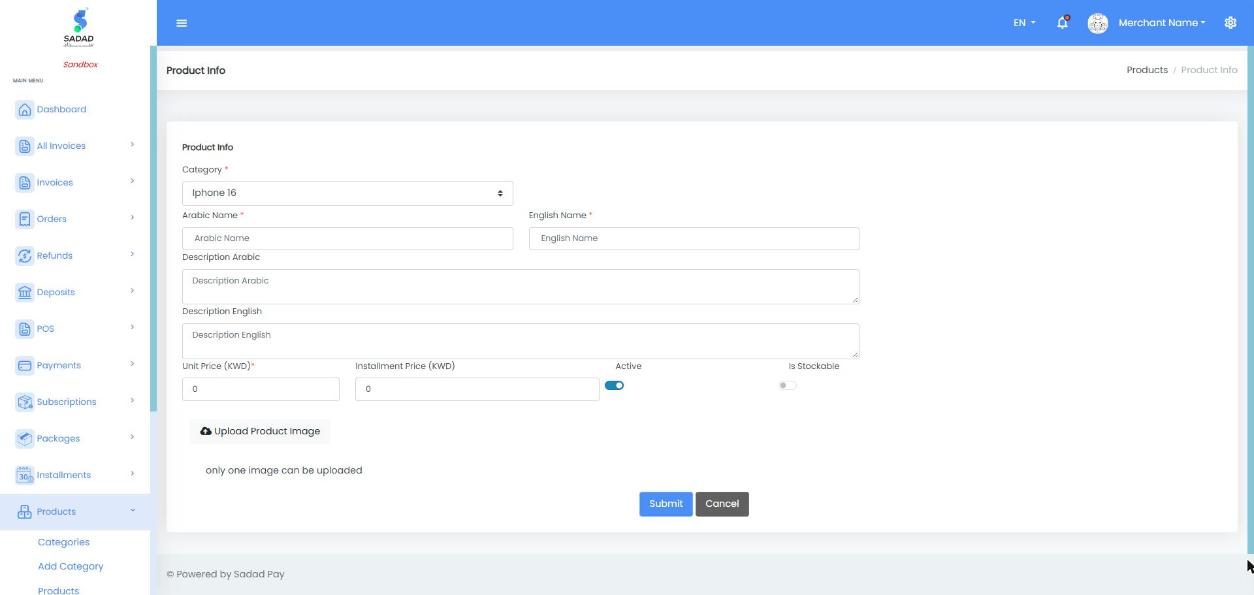
Products → Add Product: category, Arabic and English names, unit price and stock
3. Create the product link
- Go to Product Links → Add Product Link.
- Enter the English and Arabic name of the shop.
- Choose the products to include.
- Optional: add Terms and Conditions and choose the Payment Methods to offer.
- Save. Your link appears in Product Links, with an English and an Arabic URL.
https://sadadpay.net/productLnk/en/{key}
https://sadadpay.net/productLnk/ar/{key}
In Sandbox, the domain is sandbox.sadadpay.net.
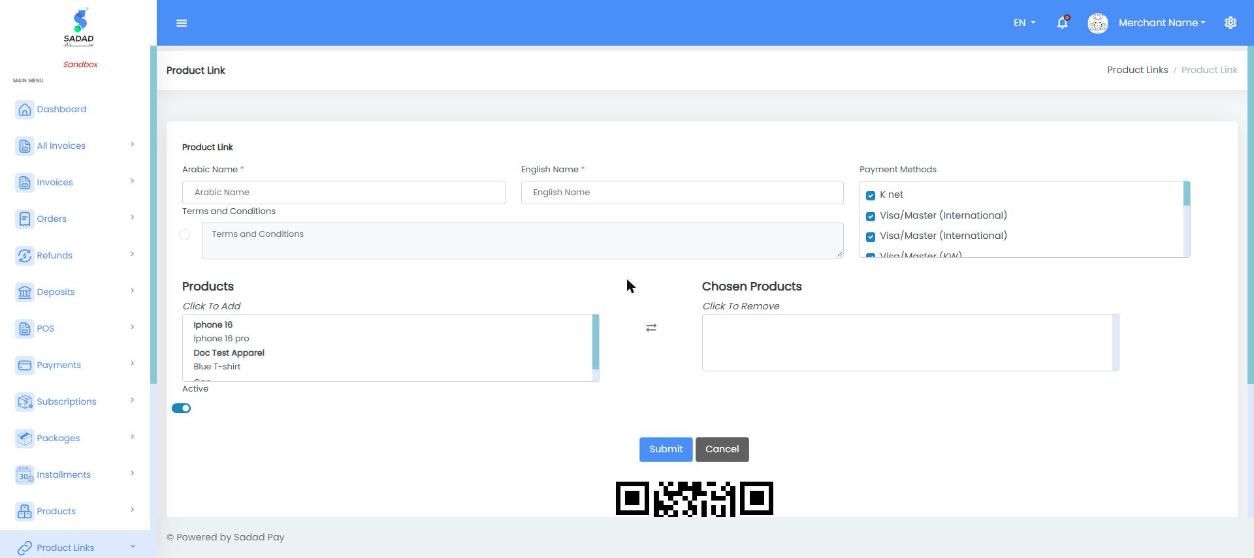
Product Links → Add Product Link: click products on the left to add them to the link
What your customer sees
The customer chooses quantities with + and −, enters their name and mobile number, and taps Pay Now. SADAD Pay creates the invoice and opens the usual payment page, where they pay with KNET, card or Apple Pay. The page also shows a QR code for the link.
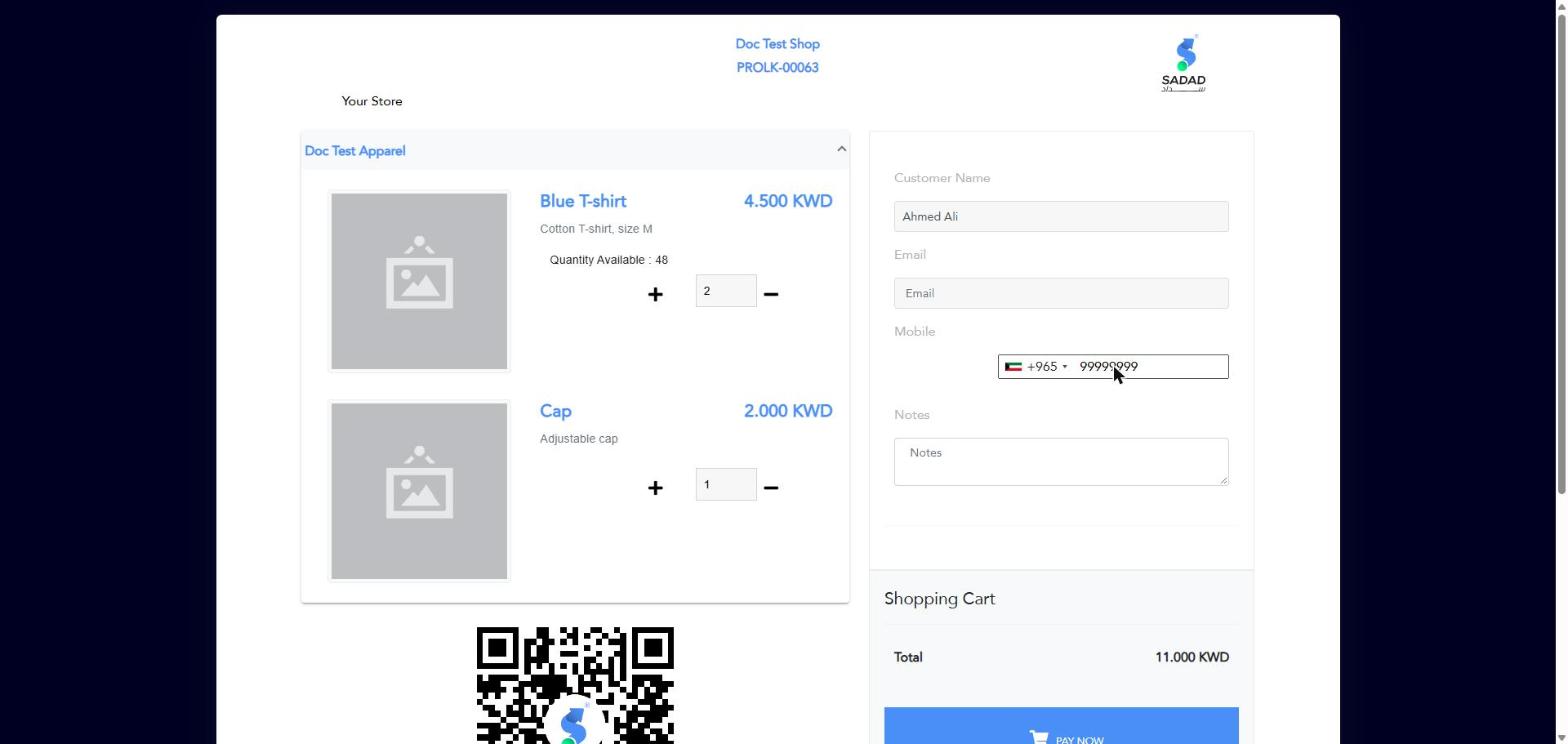
A product link with two items in the cart
Customer details
Customer Name and Mobile are required on product links. Email and notes are optional.
Manage products with the API
You can keep your catalogue in sync from your own system. All endpoints need an Access Token: see API Keys & Authentication.
| Task | Endpoint |
|---|---|
| List / get / add / change / delete categories | GET /api/ProductCategory/getall, GET …/getbyid, POST …/insert, PUT …/update, DELETE …/delete |
| List / get / add / change / delete products | GET /api/Product/getall, GET …/getbyid, POST …/insert, PUT …/update, DELETE …/delete |
| List / get / add / change / delete product links | GET /api/ProductLink/getall, GET …/getbykey, POST …/insert, PUT …/update, DELETE …/delete?key={key} |
| Create an invoice from a product link | POST /api/Invoice/createproductlinkinvoice |
Add a product
POST /api/Product/insert
| Field | Type | Required | Description | Example |
|---|---|---|---|---|
category_Id | integer | Yes | The category ID, from ProductCategory/insert or getall | 48 |
name_En | string | Yes | English name | "Blue T-shirt" |
name_Ar | string | Yes | Arabic name | "قميص أزرق" |
price | number | Yes | Price of one unit, in KWD. Greater than 0. | 4.500 |
desc_En, desc_Ar | string | No | Descriptions | "Cotton, size M" |
stockable | boolean | No | Track stock for this product | true |
quantity | integer | No | Units in stock, when stockable is true | 50 |
stockable_Show | boolean | No | Show the stock left to customers | true |
image | string | No | The product image | |
inActive | boolean | No | true to hide the product | false |
curl -X POST "https://apisandbox.sadadpay.net/api/Product/insert" \
  -H "Authorization: Bearer YOUR_ACCESS_TOKEN" \
  -H "Content-Type: application/json" \
  -d '{
    "category_Id": 48,
    "name_En": "Blue T-shirt",
    "name_Ar": "قميص أزرق",
    "desc_En": "Cotton T-shirt, size M",
    "price": 4.500,
    "stockable": true,
    "quantity": 50,
    "stockable_Show": true,
    "inActive": false
  }'
{
  "isValid": true,
  "errorKey": null,
  "response": {
    "id": 83
  }
}
Create a product link
POST /api/ProductLink/insert
curl -X POST "https://apisandbox.sadadpay.net/api/ProductLink/insert" \
  -H "Authorization: Bearer YOUR_ACCESS_TOKEN" \
  -H "Content-Type: application/json" \
  -d '{
    "name_En": "Summer Collection",
    "name_Ar": "تشكيلة الصيف",
    "inActive": false,
    "terms_Condition_Enabled": false,
    "products": [ { "product_Id": 83 }, { "product_Id": 84 } ]
  }'
{
  "isValid": true,
  "errorKey": null,
  "response": {
    "id": "4278114163"
  }
}
The id in the response is the link's key. Your shop is at https://sandbox.sadadpay.net/productLnk/en/4278114163.
Create an invoice from a product link
POST /api/Invoice/createproductlinkinvoice · API Reference
Creates the same invoice as when a customer taps Pay Now. Use it to build your own shop or chat ordering on top of your SADAD Pay catalogue.
| Field | Type | Required | Description | Example |
|---|---|---|---|---|
productLink_Key | integer | Yes | The product link key | 4278114163 |
customer_Name | string | Yes | The customer's name | "Ahmed Ali" |
customer_Mobile | string | Yes | The customer's mobile number | "99999999" |
products | array | Yes | The items, each with product_Id, quantity and amount (the product's unit price) | See example |
totalAmount | number | Yes | The total of all items (quantity × amount) | 11.000 |
currency_Code | string | Yes | KWD | "KWD" |
customer_Email | string | No | The customer's email | "[email protected]" |
lang | string | No | en or ar | "en" |
comment | string | No | A note on the order | "Gift wrap please" |
curl -X POST "https://apisandbox.sadadpay.net/api/Invoice/createproductlinkinvoice" \
  -H "Authorization: Bearer YOUR_ACCESS_TOKEN" \
  -H "Content-Type: application/json" \
  -d '{
    "productLink_Key": 4278114163,
    "customer_Name": "Ahmed Ali",
    "customer_Mobile": "99999999",
    "customer_Email": "[email protected]",
    "lang": "en",
    "totalAmount": 11.000,
    "currency_Code": "KWD",
    "products": [
      { "product_Id": 83, "quantity": 2, "amount": 4.500 },
      { "product_Id": 84, "quantity": 1, "amount": 2.000 }
    ]
  }'
{
  "isValid": true,
  "errorKey": null,
  "response": {
    "invoice_Key": 2573753792954
  }
}
Send your customer to https://sandbox.sadadpay.net/pay/{invoice_Key} (Live: https://sadadpay.net/pay/{invoice_Key}). Then confirm the payment as described in Verify Payment Status.
Common errors
| errorKey | Endpoint | Cause | How to fix |
|---|---|---|---|
NameEnRequired / NameArRequired | Product/insert | The English or Arabic name is missing | Send both name_En and name_Ar |
PriceRequired | Product/insert | price is missing or 0 | Send a price greater than 0 |
CustomerMobileRequired | createproductlinkinvoice | customer_Mobile is missing | Send the customer's mobile number |
InvalidProductAmount | createproductlinkinvoice | An item's amount is not the product's price | Send each product's current price |
InvoiceAmountMustEqualsToTotalItemsAmount | createproductlinkinvoice | totalAmount is not the sum of the items | Send totalAmount = sum of quantity × amount |
YouExceededAvailableQuantity | createproductlinkinvoice | The quantity is more than the stock left | Lower the quantity, or add stock to the product |
InvalidAccessToken / InvalidToken (HTTP 401) | All | The Access Token is missing, wrong or expired | Generate a new Access Token |
Next steps
- Confirm payments with Verify Payment Status and Webhooks.
- For one-off amounts, use Payment Links.