

Get notified on your server when an invoice is paid, even if the customer never returns to your site.
A webhook is a message that SADAD Pay sends to your server when an invoice is paid. It reaches you even when the customer closes the browser before returning to your site, so it is the most reliable way to keep your orders up to date.
Use webhooks together with the return page
The return page gives your customer an instant result. The webhook makes sure your system finds out even if the customer never comes back. Use both, and always verify before you update the order.
Which payments send a webhook
| Event | Webhook? |
|---|---|
| Invoice paid, for an invoice created through the API, including invoices created by the e-commerce plugins | Yes |
| Invoice created in the merchant portal (Quick Invoice, Add Invoice, batch) | No |
| Refunds | No |
| Failed or cancelled payment attempts | No |
If you create invoices in the portal, confirm their payments in the portal or with Verify Payment Status.
Payments before you set the URL
Webhooks are only sent once a Webhook URL is saved. Eligible payments made before that are queued and sent as soon as you add the URL.
Timing
The webhook is not instant. It usually arrives within about a minute of the payment (52 seconds in our Sandbox test). The customer may reach your return URL first, so check the payment there with Verify Payment Status instead of waiting for the webhook.
Step 1: Set your Webhook URL
- Log in to the SADAD Pay portal.
- Go to Profile → Update Profile → API.
- Enter your endpoint in WebhookURL, for example
https://yourstore.com/webhooks/sadadpay. - Click Update.
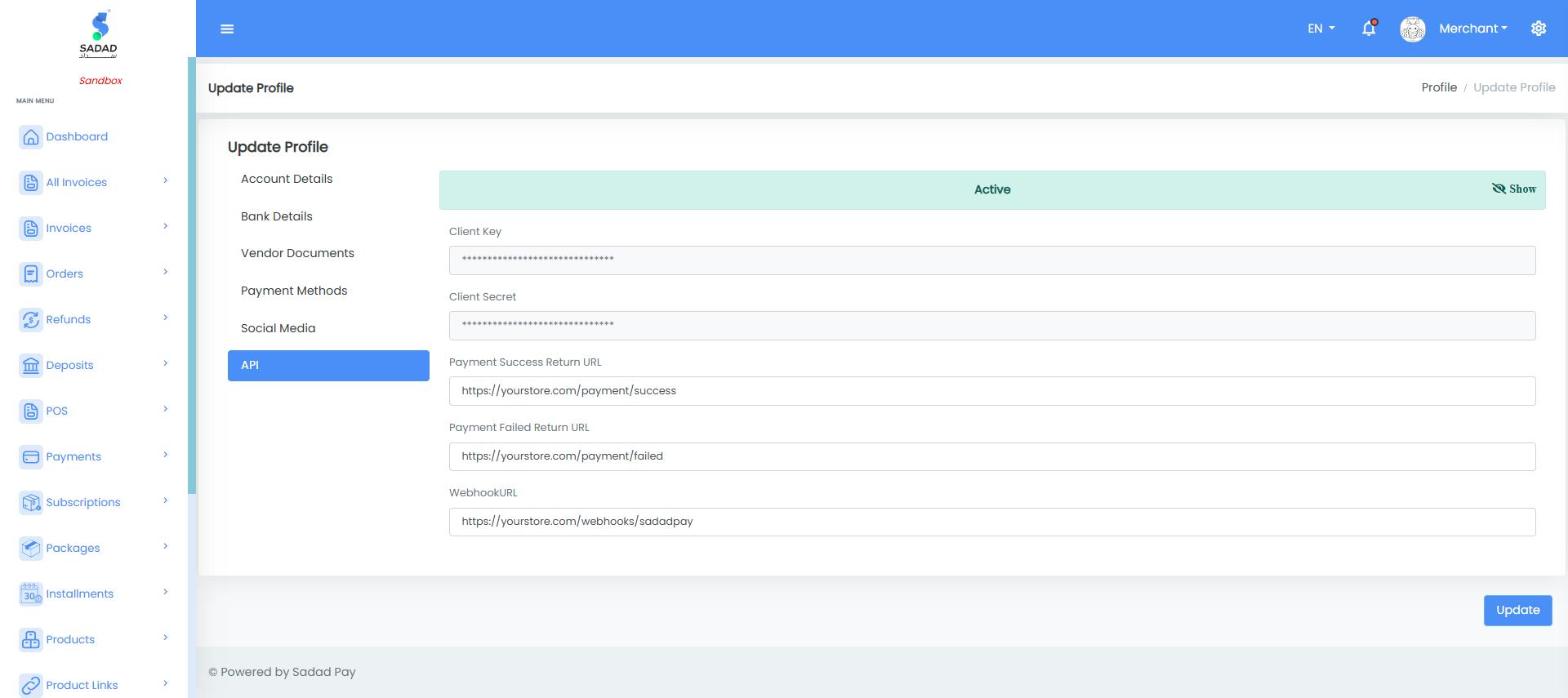
Webhook URL in Profile → Update Profile → API
Your endpoint must:
- Be reachable from the internet (use HTTPS)
- Accept a
POSTrequest with a JSON body - Not require a login or cookie
- Reply quickly with HTTP
200
Sandbox and Live are separate
Set the Webhook URL in each environment. Use a test endpoint in Sandbox and your real endpoint in Live.
Step 2: Receive the webhook
When an invoice is paid, SADAD Pay sends a POST request to your Webhook URL.
Request headers
| Header | Example | Description |
|---|---|---|
Content-Type | application/json; charset=utf-8 | The body is JSON |
X-Sadad-Signature | sha256=020ff866… | A signature of the request. See Check the signature. |
X-Sadad-Timestamp | 1794830763 | When the request was sent, in Unix time (seconds) |
Request body
{
  "invoiceId": 92509,
  "invoiceCode": "INV-92509",
  "invoiceKey": 3626596592509,
  "status": "Paid",
  "amount": 10,
  "paymentMethod": "K net",
  "transactionId": "631610008806453",
  "session_Id": null,
  "transactionStatus": "Success",
  "payment_Date": "11/12/2026 12:43:43"
}
{
  "invoiceId": 71461,
  "invoiceCode": "INV-71461",
  "invoiceKey": 7966905071461,
  "status": "Paid",
  "amount": 1.5,
  "paymentMethod": "K net",
  "transactionId": "631310009706513",
  "session_Id": "11782RHMLZ1hZoc4qUjr60XNl5cAi3nqVky0KqPM8xudAnugbLnxyML",
  "transactionStatus": "Success",
  "payment_Date": "11/09/2026 12:43:36"
}
| Field | Type | Description |
|---|---|---|
invoiceId | integer | The SADAD Pay invoice ID. Use it to verify the payment. |
invoiceCode | string | The invoice code, such as INV-92509 |
invoiceKey | integer | The invoice key, used in the payment link /pay/{invoiceKey} |
status | string | The invoice status, Paid |
amount | number | The amount paid, in KWD |
paymentMethod | string | How the customer paid, such as K net or Visa/Master (KW) |
transactionId | string | The payment network's transaction ID |
session_Id | string or null | The checkout session ID, for Embedded Payment. null for other payments. |
transactionStatus | string | The result of the payment transaction, Success |
payment_Date | string | When the invoice was paid (MM/dd/yyyy HH:mm:ss) |
Step 3: Reply with HTTP 200
Reply with HTTP status 200 as soon as you have received the request. The body of your reply is ignored.
If SADAD Pay does not get a 200, for example because your server is down or returns an error, it tries again: up to 5 attempts in total, a few minutes apart. After the fifth attempt the webhook is not sent again. This also means you can receive the same webhook more than once.
Reply first, work after
Save the request and reply
200straight away, then verify and update the order. If your processing is slow, SADAD Pay may treat the request as failed and send it again.
Step 4: Verify, then update the order
Treat the webhook as a signal that something happened, not as proof of payment. Before you change anything:
- Call
GET /api/Invoice/getbyid?id={invoiceId}and apply the checks in Verify Payment Status:statusisPaid,ref_Numberis your order, and the amount matches. - If the order is already marked as paid, do nothing. Webhooks can arrive more than once, and after your return page has already updated the order.
<?php
// https://yourstore.com/webhooks/sadadpay
$raw  = file_get_contents('php://input');
$data = json_decode($raw, true);
if (is_string($data)) {          // body sent as a JSON-encoded string
    $data = json_decode($data, true);
}

// 1. Acknowledge straight away
http_response_code(200);
echo 'OK';
if (function_exists('fastcgi_finish_request')) {
    fastcgi_finish_request();
}

if (empty($data['invoiceId'])) {
    return;
}

// 2. Verify with the API (never trust the webhook body alone)
$ch = curl_init('https://apisandbox.sadadpay.net/api/Invoice/getbyid?id=' . (int) $data['invoiceId']);
curl_setopt_array($ch, [
    CURLOPT_RETURNTRANSFER => true,
    CURLOPT_HTTPHEADER     => ['Authorization: Bearer ' . getAccessToken()],
]);
$body = json_decode(curl_exec($ch), true);
curl_close($ch);

$invoice = $body['response'] ?? null;
if (!$invoice || $invoice['status'] !== 'Paid') {
    return;
}

// 3. Update the order once
$order = findOrderByNumber($invoice['ref_Number']);
if ($order && $order['status'] !== 'paid' && abs($invoice['amount'] - $order['total']) < 0.001) {
    markOrderPaid($order, $invoice['transactionID']);
}
app.post('/webhooks/sadadpay', express.json({ strict: false }), async (req, res) => {
  // 1. Acknowledge straight away
  res.sendStatus(200);

  const body = typeof req.body === 'string' ? JSON.parse(req.body) : req.body;
  const { invoiceId } = body || {};
  if (!invoiceId) return;

  // 2. Verify with the API (never trust the webhook body alone)
  const r = await fetch(
    `https://apisandbox.sadadpay.net/api/Invoice/getbyid?id=${invoiceId}`,
    { headers: { Authorization: `Bearer ${await getAccessToken()}` } }
  );
  const body = await r.json();
  const invoice = body.response;
  if (!body.isValid || !invoice || invoice.status !== 'Paid') return;

  // 3. Update the order once
  const order = await findOrderByNumber(invoice.ref_Number);
  if (order && order.status !== 'paid' && Math.abs(invoice.amount - order.total) < 0.001) {
    await markOrderPaid(order, invoice.transactionID);
  }
});
Currency
amountin the webhook and ingetbyidis in KWD. If the invoice was created in another currency, comparealt_Amountfromgetbyidwith your order total instead.
Check the signature
Every webhook is signed with your Client Secret, the same secret you use for API authentication. There is no separate webhook secret. Check the signature to make sure the request really came from SADAD Pay and was not changed.
How the signature is made
- SADAD Pay takes the Unix timestamp in seconds (sent in
X-Sadad-Timestamp) and the raw request body. - It joins them with a dot:
timestamp.body - It signs that string with HMAC-SHA256, using your Client Secret as the key.
- It sends the result, hex-encoded in lowercase, as
X-Sadad-Signature: sha256=<signature>.
How to check it
- Read the raw request body exactly as received, before any JSON parsing.
- Build
X-Sadad-Timestamp+.+ raw body. - Compute HMAC-SHA256 of that string with your Client Secret, in lowercase hex, and add
sha256=in front. - Compare it with
X-Sadad-Signatureusing a constant-time comparison. If they differ, reply401and ignore the request.
<?php
$clientSecret = getenv('SADAD_CLIENT_SECRET');

$raw       = file_get_contents('php://input');
$timestamp = $_SERVER['HTTP_X_SADAD_TIMESTAMP'] ?? '';
$received  = $_SERVER['HTTP_X_SADAD_SIGNATURE'] ?? '';

$expected = 'sha256=' . hash_hmac('sha256', $timestamp . '.' . $raw, $clientSecret);

if (!hash_equals($expected, $received)) {
    http_response_code(401);
    exit;
}

// Signature is valid: read the payload
$data = json_decode($raw, true);
if (is_string($data)) {          // body sent as a JSON-encoded string
    $data = json_decode($data, true);
}
const crypto = require('crypto');
const clientSecret = process.env.SADAD_CLIENT_SECRET;

// Keep the raw body: do not use express.json() on this route
app.post('/webhooks/sadadpay', express.raw({ type: '*/*' }), (req, res) => {
  const raw = req.body.toString('utf8');
  const timestamp = req.get('X-Sadad-Timestamp') || '';
  const received = req.get('X-Sadad-Signature') || '';

  const expected = 'sha256=' + crypto
    .createHmac('sha256', clientSecret)
    .update(`${timestamp}.${raw}`)
    .digest('hex');

  const ok = received.length === expected.length &&
    crypto.timingSafeEqual(Buffer.from(received), Buffer.from(expected));
  if (!ok) return res.sendStatus(401);

  res.sendStatus(200);

  // Signature is valid: read the payload
  let data = JSON.parse(raw);
  if (typeof data === 'string') data = JSON.parse(data); // body sent as a JSON-encoded string
  // ...verify data.invoiceId with the API, then update the order (Step 4)
});
Use the raw body
Compute the signature on the body exactly as received. If your framework parses the JSON first and you re-encode it, spacing or field order can change and the signature will not match.
Read the payload safely
The body may be a JSON object, or a JSON-encoded string that contains the JSON. Parse it once; if the result is a string, parse it again, as in the examples above.
Keep verifying with the API
A valid signature proves the webhook came from SADAD Pay. Still call
getbyidbefore completing the order (Step 4), as the API is the final source of truth.
Test your webhook
- In Sandbox, set your Webhook URL. If your server is not online yet, you can use a free request-inspection service to see what SADAD Pay sends.
- Create a test invoice and pay it with a test card.
- Check that your endpoint received the request, replied
200, verified the invoice and updated the order. - Send the same request to your endpoint again, and check that the order is not updated twice.
Webhooks may not arrive instantly
Delivery can take a few minutes. Use scheduled checks as a safety net for any payment whose webhook is delayed or lost.
Troubleshooting
| Problem | What to check |
|---|---|
| No webhook arrives | Webhooks are sent only for invoices created through the API. Check that the Webhook URL is set in the same environment (Sandbox or Live) and was saved before the invoice was created, and that the URL is public, uses HTTPS and is not blocked by a firewall. |
| The same webhook arrives several times | Your endpoint did not reply 200 quickly enough, or SADAD Pay is retrying. Make your processing safe to repeat. |
getbyid returns UnauthorizedAccess (403) | You are calling a different environment from the one the invoice belongs to, or using another account's token. |
Next steps
- Learn how to read and check the invoice in Verify Payment Status.
- Map each status to your orders with Payment Status Guidelines.
- Before going live, follow the Go-Live Checklist.